calrs
Fast, self-hostable scheduling. Like Cal.com, but written in Rust.
calrs is an open-source scheduling platform. Connect your CalDAV calendar (Nextcloud, Fastmail, BlueMind, iCloud, Google…), define bookable meeting types, and share a link. No Node.js, no PostgreSQL, no subscription.
Key features
- CalDAV sync — pull events from any CalDAV server for free/busy computation, with multi-VEVENT support for recurring event modifications
- CalDAV write-back — confirmed bookings are automatically pushed to your calendar
- Availability engine — computes free slots from availability rules + calendar events
- Recurring events — RRULE expansion (DAILY/WEEKLY/MONTHLY with INTERVAL, UNTIL, COUNT, BYDAY, EXDATE) blocks availability correctly
- Event types — bookable meeting templates with duration, buffers, minimum notice
- Booking flow — public slot picker, booking form, email confirmations with
.icsinvites - Email approve/decline — approve or decline pending bookings directly from the notification email
- HTML emails — clean, responsive HTML notifications with plain text fallback
- Groups — combined availability with round-robin assignment
- Timezone support — guest timezone picker with browser auto-detection
- Authentication — local accounts (Argon2) or OIDC/SSO (Keycloak, Authentik, etc.)
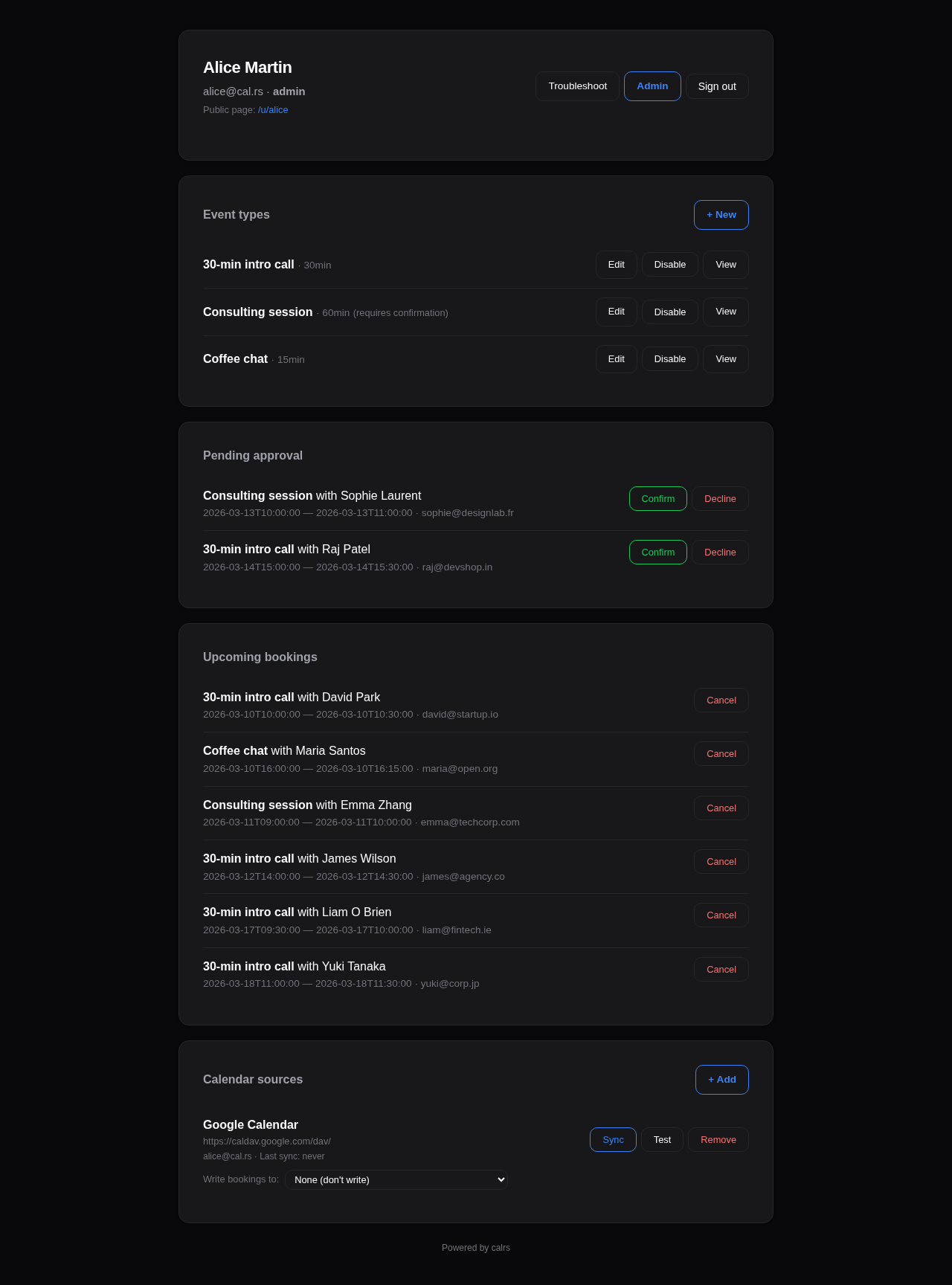
- Web dashboard — manage event types, calendar sources, pending approvals, bookings
- Admin panel — user management, auth settings, OIDC config, SMTP status, impersonation
- Availability troubleshoot — visual timeline showing why slots are blocked
- SQLite storage — single-file WAL-mode database, zero ops
- Single binary — no runtime dependencies
How it works
- Connect your CalDAV calendar (or multiple calendars)
- Sync events so calrs knows when you’re busy
- Create event types with your availability schedule
- Share your booking link (
/u/yourname/meeting-slug) - Guests pick a slot, fill in their details, and book
- Both parties get an email with a calendar invite
- The booking appears on your CalDAV calendar automatically
License
AGPL-3.0 — free to use, modify, and self-host.
Getting Started
Installation
See Deployment for Docker, systemd, and binary install options.
For development:
cargo build --release
First-time setup
Option 1: Web UI (recommended)
- Start the server:
calrs serve --port 3000 - Open
http://localhost:3000in your browser - Register an account — the first user automatically becomes admin
- From the dashboard, add a CalDAV source and create your first event type
Option 2: CLI
# Create an admin user
calrs user create --email alice@example.com --name "Alice" --admin

# Connect your CalDAV calendar
calrs source add --url https://nextcloud.example.com/remote.php/dav \
                 --username alice --name "My Calendar"

# Pull events
calrs sync

# Create a bookable meeting type
calrs event-type create --title "30min intro call" --slug intro --duration 30

# Check available slots
calrs event-type slots intro

# Start the web server
calrs serve --port 3000
Environment variables
| Variable | Description | Default |
|---|---|---|
CALRS_DATA_DIR | Directory for the SQLite database | Platform-specific (XDG) |
CALRS_BASE_URL | Public URL (needed for OIDC callbacks and email action links) | http://localhost:3000 |
Data directory
calrs stores everything in a single SQLite database (calrs.db) inside the data directory. By default this follows XDG conventions:
- Linux:
~/.local/share/calrs/ - macOS:
~/Library/Application Support/calrs/
Override with CALRS_DATA_DIR or --data-dir.
Quick test
After setup, your booking page is available at:
/u/yourname— your profile listing all event types/u/yourname/intro— the slot picker for the “intro” event type
CalDAV Integration
calrs connects to any CalDAV server to read your calendar for free/busy computation and optionally write confirmed bookings back.
Connecting a calendar source
From the web dashboard
- Go to Dashboard > Calendar sources > + Add
- Select your provider (BlueMind, Nextcloud, Fastmail, etc.) — the URL is auto-filled
- Enter your username and password
- Click Add source
The connection is tested automatically before saving. Use “Skip connection test” if your server doesn’t respond to OPTIONS requests (e.g., BlueMind).

From the CLI
calrs source add --url https://nextcloud.example.com/remote.php/dav \
                 --username alice --name "Work Calendar"

# Skip connection test if needed
calrs source add --url https://mail.company.com/dav/ \
                 --username alice --name "BlueMind" --no-test
Provider URLs
| Provider | CalDAV URL |
|---|---|
| BlueMind | https://mail.yourcompany.com/dav/ |
| Nextcloud | https://cloud.example.com/remote.php/dav |
| Fastmail | https://caldav.fastmail.com/dav/calendars/user/you@fastmail.com/ |
| iCloud | https://caldav.icloud.com/ |
https://apidata.googleusercontent.com/caldav/v2/your@gmail.com/ | |
| Zimbra | https://mail.example.com/dav/ |
| SOGo | https://mail.example.com/SOGo/dav/ |
| Radicale | https://cal.example.com/ |
Tip: Use app-specific passwords for Fastmail, iCloud, and Google.
Auto-discovery
calrs follows the CalDAV standard (RFC 4791) for discovery:
- PROPFIND on the base URL to find the
current-user-principal - PROPFIND on the principal to find the
calendar-home-set - PROPFIND on the calendar home to list all calendars
- Filters to actual
calendarcollections (skips inbox, outbox, tasks, etc.)
Syncing
# Sync all sources
calrs sync

# Full re-sync (ignore sync tokens)
calrs sync --full
From the dashboard, click Sync on any source to trigger a sync.
Sync pulls all VEVENT data from your calendars and stores it in the local SQLite database. Events are upserted by UID (and RECURRENCE-ID for modified instances), so re-syncing is safe.
Multi-VEVENT resources
Some CalDAV servers (notably BlueMind) bundle recurring events and their modified instances into a single CalDAV resource containing multiple VEVENTs. calrs splits these and stores each VEVENT as a separate row:
- The parent event has the RRULE and is stored with its UID
- Modified instances have a RECURRENCE-ID and are stored alongside the parent with a composite unique key
(uid, recurrence_id) - This ensures modified occurrences correctly block (or free) availability
CalDAV write-back
When a booking is confirmed, calrs can automatically push it to your CalDAV calendar as a VEVENT. When a booking is cancelled, the event is deleted.
Setup
- Sync your calendar source at least once (so calrs knows which calendars exist)
- On the dashboard, find your source under “Calendar sources”
- Use the “Write bookings to” dropdown to select which calendar should receive bookings
- Select “None” to disable write-back
How it works
- On confirmation: calrs generates an ICS event and PUTs it to
{calendar-href}/{booking-uid}.ics - On cancellation: calrs DELETEs the event from the same path
- The booking tracks which calendar it was pushed to, so cancellation always targets the right calendar
- If no write calendar is configured, write-back is silently skipped (emails still work)
- Write-back works for individual bookings, group round-robin bookings, and pending-then-confirmed bookings
Managing sources
# List all sources
calrs source list

# Test a connection
calrs source test <id-prefix>

# Remove a source (cascade-deletes calendars and events)
calrs source remove <id-prefix>
From the dashboard: Sync, Test, and Remove buttons are available for each source.
Credentials
Passwords are hex-encoded and stored in the SQLite database. This is not encryption — it prevents accidental display in logs but does not protect against database access. Secure your data directory appropriately.
Event Types
Event types are bookable meeting templates. Each one defines the duration, availability schedule, and booking rules.
Creating an event type
From the dashboard
Go to Dashboard > Event types > + New and fill in:
- Title — display name (e.g., “30-minute intro call”)
- Slug — URL path (e.g.,
introgives/u/yourname/intro) - Duration — meeting length in minutes
- Buffer before/after — padding between meetings (prevents back-to-back bookings)
- Minimum notice — how far in advance guests must book (in minutes)
- Requires confirmation — if checked, bookings start as “pending” and you approve from the dashboard
- Location — video link, phone number, in-person address, or custom text
- Availability schedule — which days and hours you’re available

From the CLI
calrs event-type create \
  --title "30min intro call" \
  --slug intro \
  --duration 30 \
  --buffer-before 5 \
  --buffer-after 5
Availability schedule
Each event type has its own availability rules. By default: Monday–Friday, 09:00–17:00.
From the dashboard form, you can set:
- Which days of the week are available (checkboxes)
- Start and end time for available hours
The availability engine intersects these rules with your synced calendar events and existing bookings to compute free slots.
Slot computation
Available slots are computed by:
- Generating candidate slots from availability rules (day of week + time range)
- Filtering out slots that overlap with calendar events (from CalDAV sync)
- Filtering out slots that overlap with confirmed bookings
- Applying buffer times (before and after each slot)
- Removing slots that violate minimum notice (too close to now)
# View available slots for the next 7 days
calrs event-type slots intro

# View slots for the next 14 days
calrs event-type slots intro --days 14
Location
Event types support four location types:
| Type | Description |
|---|---|
link | Video meeting URL (Zoom, Meet, etc.) |
phone | Phone number |
in_person | Physical address |
custom | Free-text description |
The location is displayed on the public booking page, in confirmation emails, and in .ics calendar invites.
Enabling/disabling
Event types can be toggled on/off from the dashboard without deleting them. Disabled event types don’t show up on your public profile and return 404 on their booking page.
Public URLs

- Profile:
/u/yourname— lists all enabled event types - Slot picker:
/u/yourname/slug— shows available time slots - Booking form:
/u/yourname/slug/book?date=...&time=...— booking form for a specific slot
Booking Flow
Guest experience
- Visit the booking page —
/u/host/meeting-slug - Pick a timezone — auto-detected from the browser, changeable via dropdown
- Browse available slots — displayed as a week view, navigate with Previous/Next buttons
- Click a slot — opens the booking form
- Fill in details — name, email, optional notes
- Submit — booking is created
- Confirmation page — shows booking summary
- Email — guest receives a confirmation email with an
.icscalendar invite attached


Booking statuses
| Status | Description |
|---|---|
confirmed | Booking is active. Slot is blocked. Emails sent. |
pending | Awaiting host approval (when requires_confirmation is on). |
cancelled | Cancelled by host. Slot is freed. |
declined | Declined by host (pending booking rejected). |
Confirmation mode
When an event type has requires confirmation enabled:
- Guest submits booking → status is
pending - Guest receives a “pending” email (no
.icsyet) - Host receives an “approval request” email with Approve and Decline buttons
- Host can approve/decline in two ways:
- From the email — click the Approve or Decline button (no login required, token-based)
- From the dashboard — go to Pending approval section and click Confirm or Decline
- On confirm: status becomes
confirmed, guest receives confirmation email with.ics, booking is pushed to CalDAV - On decline: status becomes
declined, guest receives a decline notification with optional reason
Note: The email action buttons require
CALRS_BASE_URLto be set. Without it, the host must use the dashboard.
Cancellation
From the dashboard, click Cancel on an upcoming booking:
- Optionally enter a reason
- Confirm the cancellation
- Both guest and host receive cancellation emails with a
METHOD:CANCEL.icsattachment - If the booking was pushed to CalDAV, the event is deleted from the calendar
Conflict detection
Before a booking is accepted, calrs checks for conflicts:
- Calendar events — from synced CalDAV sources
- Existing bookings — confirmed bookings on any event type
- Buffer times — the buffer before/after is included in the conflict window
- Minimum notice — slots too close to the current time are rejected
CalDAV write-back
When a booking is confirmed (either directly or via approval), calrs can push the event to the host’s CalDAV calendar. See CalDAV Integration > Write-back for setup.
Email notifications
If SMTP is configured, calrs sends emails at these moments:
| Event | Guest receives | Host receives |
|---|---|---|
| Booking confirmed | Confirmation + .ics REQUEST | Notification + .ics REQUEST |
| Booking pending | “Awaiting confirmation” notice | Approval request with Approve/Decline buttons |
| Booking declined | Decline notice (with optional reason) | — |
| Booking cancelled | Cancellation + .ics CANCEL | Cancellation + .ics CANCEL |
All emails are sent as HTML with plain text fallback. They include event title, date, time, timezone, location, and notes. The HTML templates are responsive and support dark mode in email clients that honor prefers-color-scheme.
Timezone handling
- Guest’s timezone is auto-detected via
Intl.DateTimeFormatin the browser - A timezone dropdown lets the guest change it
- Slots are displayed in the guest’s selected timezone
- The booking is stored in the host’s timezone
- The timezone is preserved across navigation (week picker, booking form)
CLI booking
calrs booking create intro \
  --date 2026-03-20 --time 14:00 \
  --name "Jane Doe" --email jane@example.com \
  --timezone Europe/Paris --notes "Let's discuss the project"
Groups
Groups allow multiple users to share a single booking page with combined availability and automatic assignment.
How groups work
- Groups are synced from your OIDC provider (e.g., Keycloak
groupsJWT claim) - A group event type shows slots where any group member is free
- When a guest books, the booking is assigned to the least-busy available member (round-robin)
- Each member’s CalDAV calendar and existing bookings are checked independently
Group sync (OIDC)
Groups are created automatically from the groups claim in the OIDC ID token:
- User logs in via SSO
- calrs reads the
groupsclaim from the JWT - Groups are created if they don’t exist (leading
/stripped from Keycloak paths) - User is added to their groups and removed from groups they no longer belong to
Groups are only available with OIDC authentication. Local-only users cannot be in groups.
Creating group event types
From the dashboard:
- Click + New under “Group event types”
- Select the group from the dropdown (only groups you belong to are shown)
- Fill in the event type details (same as individual event types)
Public group pages
- Group profile:
/g/group-slug— lists all enabled group event types - Slot picker:
/g/group-slug/meeting-slug— shows slots where any member is free - Booking:
/g/group-slug/meeting-slug/book?date=...&time=...
Round-robin assignment
When a booking is submitted for a group event type:
- calrs finds all group members
- For each member, checks if the slot is free (no calendar events or bookings in the buffer window)
- Among available members, picks the one with the fewest confirmed bookings
- The booking is assigned to that member
- If no member is available, the booking is rejected
Dashboard
Group event types appear in a separate “Group event types” section on the dashboard, showing the group name and a link to the public page.
Keycloak setup
In your Keycloak realm:
- Create groups under Groups (e.g., “Sales”, “Engineering”)
- Assign users to groups
- Add a
groupsmapper to your client:- Mapper type: Group Membership
- Token claim name:
groups - Add to ID token: ON
- Full group path: ON (calrs strips the leading
/)
Authentication
calrs supports two authentication methods: local accounts and OIDC (OpenID Connect) SSO.

Local accounts
Registration
- The first user to register becomes admin
- Registration can be enabled/disabled from the admin dashboard or CLI
- Registration can be restricted to specific email domains
# Disable open registration
calrs config auth --registration false

# Restrict to a domain
calrs config auth --allowed-domains company.com

# Allow any domain
calrs config auth --allowed-domains any
Password hashing
Passwords are hashed with Argon2 (via the argon2 crate with password-hash). Plain-text passwords are never stored.
Sessions
- Server-side sessions stored in SQLite
- 30-day TTL
- Session ID in an HttpOnly cookie (not accessible to JavaScript)
- Sessions are invalidated on logout
User management (CLI)
calrs user create --email alice@example.com --name "Alice" --admin
calrs user list
calrs user set-password alice@example.com
calrs user promote alice@example.com    # → admin
calrs user demote alice@example.com     # → user
calrs user disable alice@example.com
calrs user enable alice@example.com
OIDC / SSO
calrs supports OpenID Connect for single sign-on, tested with Keycloak and compatible with any OIDC provider (Authentik, Auth0, etc.).
Features
- Authorization code flow with PKCE — no client secret stored in the browser
- Auto-discovery — reads
.well-known/openid-configurationfrom the issuer URL - User linking by email — if a local user exists with the same email, the OIDC identity is linked
- Auto-registration — new users are created on first OIDC login (if enabled)
- Group sync — groups from the
groupsJWT claim are synced on each login
Configuration
calrs config oidc \
  --issuer-url https://keycloak.example.com/realms/your-realm \
  --client-id calrs \
  --client-secret YOUR_CLIENT_SECRET \
  --enabled true \
  --auto-register true
Or from the Admin dashboard > OIDC section.
Keycloak setup
- Create a new OpenID Connect client:
- Client ID:
calrs - Client authentication: ON (confidential)
- Valid redirect URIs:
https://your-calrs-host/auth/oidc/callback - Web origins:
https://your-calrs-host
- Client ID:
- Copy the Client secret from the Credentials tab
- Set
CALRS_BASE_URLto your public URL before starting the server
The login page will show a “Sign in with SSO” button when OIDC is enabled.
User roles
| Role | Capabilities |
|---|---|
user | Manage own event types, calendar sources, bookings |
admin | Everything above + user management, auth settings, OIDC config, SMTP config |
The first registered user is automatically promoted to admin.
Email notifications (SMTP)
SMTP configuration is required for booking confirmation emails. Without it, bookings still work but no emails are sent.
calrs config smtp \
  --host smtp.example.com \
  --port 587 \
  --username calrs@example.com \
  --from-email calrs@example.com \
  --from-name "calrs"

# Test the configuration
calrs config smtp-test you@example.com

# View current config
calrs config show
Or configure from the Admin dashboard > SMTP section.
Admin Dashboard
The admin dashboard is available at /dashboard/admin for users with the admin role.

User management
Lists all registered users with:
- Name, email, username
- Role (admin/user)
- Status (enabled/disabled)
- Groups (if using OIDC group sync)
Actions per user:
- Promote/Demote — toggle admin role
- Enable/Disable — disabled users cannot log in or receive bookings
- Impersonate — view the dashboard as that user (for troubleshooting)
Impersonation
Admins can impersonate any user to troubleshoot their view:
- Click Impersonate next to a user in the admin panel
- You are redirected to the dashboard, viewing it as that user
- A yellow banner at the top shows who you’re impersonating
- Click Stop impersonating to return to your own view
Impersonation uses a separate calrs_impersonate cookie (24-hour TTL). The real admin session is preserved.
Availability troubleshoot
For each event type, the dashboard offers a Troubleshoot link that opens a visual timeline at /dashboard/troubleshoot/{event_type_id}:
- Shows candidate slots for the next 7 days
- Displays why each slot is blocked (calendar event name, existing booking, buffer overlap)
- Helps debug availability issues when users report incorrect free/busy status

Authentication settings
- Registration — toggle open registration on/off
- Allowed domains — restrict registration to specific email domains (comma-separated) or allow any
OIDC configuration
- Enabled — toggle SSO login on/off
- Issuer URL — your OIDC provider’s base URL
- Client ID — the client ID registered with your provider
- Client secret — update the secret (current value is never displayed)
- Auto-register — automatically create users on first OIDC login
SMTP status
Shows whether SMTP is configured and the current sender address. SMTP is configured via CLI (calrs config smtp) or by editing the database directly.
Deployment
Docker / Podman (recommended)
docker build -t calrs .
docker run -d --name calrs \
  -p 3000:3000 \
  -v calrs-data:/var/lib/calrs \
  -e CALRS_BASE_URL=https://cal.example.com \
  calrs
Podman works as a drop-in replacement — just use
podmaninstead ofdockerin all commands. The Containerfile (Dockerfile) is compatible with both runtimes.
The image uses a multi-stage build:
- Builder:
rust:bookworm— compiles the release binary - Runtime:
debian:bookworm-slim— minimal image with onlyca-certificates - Runs as unprivileged
calrsuser - Data stored in
/var/lib/calrs - Templates bundled at
/opt/calrs/templates/
Docker Compose / Podman Compose
services:
  calrs:
    build: .
    ports:
      - "3000:3000"
    volumes:
      - calrs-data:/var/lib/calrs
    environment:
      - CALRS_BASE_URL=https://cal.example.com
    restart: unless-stopped

volumes:
  calrs-data:
Works with both docker compose and podman-compose.
Binary + systemd
# Build from source
cargo build --release

# Install binary and templates
sudo cp target/release/calrs /usr/local/bin/
sudo cp -r templates /var/lib/calrs/templates

# Create a system user
sudo useradd -r -s /bin/false -m -d /var/lib/calrs calrs

# Install the service
sudo cp calrs.service /etc/systemd/system/
sudo systemctl daemon-reload
sudo systemctl enable --now calrs
Edit /etc/systemd/system/calrs.service to set CALRS_BASE_URL.
systemd service
The included calrs.service has security hardening:
NoNewPrivileges=trueProtectSystem=strictProtectHome=trueReadWritePaths=/var/lib/calrsPrivateTmp=trueProtectKernelTunables=trueProtectControlGroups=trueRestart=on-failurewith 5-second delay
From source (development)
cargo build --release
calrs serve --port 3000
Then register at http://localhost:3000 — the first user becomes admin.
Reverse proxy
calrs listens on port 3000 by default. Put nginx or caddy in front for TLS.
nginx example
server {
    listen 443 ssl http2;
    server_name cal.example.com;

    ssl_certificate /etc/letsencrypt/live/cal.example.com/fullchain.pem;
    ssl_certificate_key /etc/letsencrypt/live/cal.example.com/privkey.pem;

    location / {
        proxy_pass http://127.0.0.1:3000;
        proxy_set_header Host $host;
        proxy_set_header X-Real-IP $remote_addr;
        proxy_set_header X-Forwarded-For $proxy_add_x_forwarded_for;
        proxy_set_header X-Forwarded-Proto $scheme;
    }
}
Caddy example
cal.example.com {
    reverse_proxy localhost:3000
}
Environment variables
| Variable | Description | Default |
|---|---|---|
CALRS_DATA_DIR | SQLite database directory | /var/lib/calrs (Docker/systemd) or XDG (dev) |
CALRS_BASE_URL | Public URL (required for OIDC callbacks and email action links) | http://localhost:3000 |
Backup
The entire state is in a single SQLite file (calrs.db). To back up:
sqlite3 /var/lib/calrs/calrs.db ".backup /path/to/backup.db"
Or simply copy the file when the server is stopped.
CLI Reference
Global options
--data-dir <PATH> Custom data directory (env: CALRS_DATA_DIR)
Commands
calrs source
Manage CalDAV calendar sources.
calrs source add [OPTIONS]
    --url <URL>           CalDAV server URL
    --username <USERNAME> CalDAV username
    --name <NAME>         Display name for this source
    --no-test             Skip the connection test

calrs source list

calrs source test <ID>    Test a connection (ID prefix match)

calrs source remove <ID>  Remove a source and all its data (ID prefix match)
calrs sync
Pull latest events from all CalDAV sources.
calrs sync [OPTIONS]
    --full    Full re-sync (ignore sync tokens)
calrs calendar
View synced calendar events.
calrs calendar show [OPTIONS]
    --from <DATE>    Start date (YYYY-MM-DD)
    --to <DATE>      End date (YYYY-MM-DD)
calrs event-type
Manage bookable event types.
calrs event-type create [OPTIONS]
    --title <TITLE>              Event type title (required)
    --slug <SLUG>                URL slug (required)
    --duration <MINUTES>         Duration in minutes (required)
    --description <DESC>         Description
    --buffer-before <MINUTES>    Buffer before (default: 0)
    --buffer-after <MINUTES>     Buffer after (default: 0)

calrs event-type list

calrs event-type slots <SLUG> [OPTIONS]
    --days <DAYS>    Number of days to show (default: 7)
calrs booking
Manage bookings.
calrs booking create <SLUG> [OPTIONS]
    --date <DATE>          Booking date (YYYY-MM-DD)
    --time <TIME>          Start time (HH:MM)
    --name <NAME>          Guest name
    --email <EMAIL>        Guest email
    --timezone <TZ>        Guest timezone (default: UTC)
    --notes <NOTES>        Optional notes

calrs booking list [OPTIONS]
    --upcoming    Show only upcoming bookings

calrs booking cancel <ID>    Cancel a booking (ID prefix match)
calrs config
Configure SMTP, authentication, and OIDC.
calrs config smtp [OPTIONS]
    --host <HOST>           SMTP server hostname
    --port <PORT>           SMTP port (default: 587)
    --username <USERNAME>   SMTP username
    --from-email <EMAIL>    Sender email address
    --from-name <NAME>      Sender display name

calrs config show           Display current configuration

calrs config smtp-test <EMAIL>   Send a test email

calrs config auth [OPTIONS]
    --registration <BOOL>        Enable/disable registration
    --allowed-domains <DOMAINS>  Comma-separated domains or "any"

calrs config oidc [OPTIONS]
    --issuer-url <URL>        OIDC issuer URL
    --client-id <ID>          Client ID
    --client-secret <SECRET>  Client secret
    --enabled <BOOL>          Enable/disable OIDC
    --auto-register <BOOL>    Auto-create users on first login
calrs user
Manage users (admin operations).
calrs user create [OPTIONS]
    --email <EMAIL>    User email
    --name <NAME>      User display name
    --admin            Grant admin role

calrs user list

calrs user set-password <EMAIL>

calrs user promote <EMAIL>     Promote to admin

calrs user demote <EMAIL>      Demote to regular user

calrs user disable <EMAIL>     Disable user account

calrs user enable <EMAIL>      Enable user account
calrs serve
Start the web server.
calrs serve [OPTIONS]
    --port <PORT>    Port to listen on (default: 3000)
Architecture
Project structure
calrs/
├── Cargo.toml              Package manifest
├── Dockerfile              Multi-stage Docker build
├── calrs.service           systemd unit file
├── migrations/             SQLite schema (incremental)
│   ├── 001_initial.sql     Core tables
│   ├── 002_auth.sql        Users, sessions, auth config
│   ├── 003_username.sql    Username support
│   ├── 004_oidc.sql        OIDC columns
│   ├── 005_requires_confirmation.sql
│   ├── 006_group_event_types.sql
│   ├── 007_caldav_write.sql
│   ├── 008_recurrence_id.sql
│   ├── 009_uid_recurrence_unique.sql
│   └── 010_confirm_token.sql
├── templates/              Minijinja HTML templates
│   ├── base.html           Base layout + CSS (light/dark mode)
│   ├── auth/               Login, registration
│   ├── dashboard.html      User dashboard
│   ├── admin.html          Admin panel
│   ├── source_form.html    Add CalDAV source
│   ├── event_type_form.html  Create/edit event types
│   ├── troubleshoot.html   Availability troubleshoot timeline
│   ├── slots.html          Slot picker (timezone-aware)
│   ├── book.html           Booking form
│   ├── confirmed.html      Confirmation / pending page
│   ├── booking_approved.html     Token-based approve success
│   ├── booking_decline_form.html Token-based decline form
│   ├── booking_declined.html     Token-based decline success
│   └── booking_action_error.html Invalid/expired token error
├── docs/                   mdBook documentation
└── src/
    ├── main.rs             CLI entry point (clap)
    ├── db.rs               SQLite connection + migrations
    ├── models.rs           Domain types
    ├── auth.rs             Authentication (local + OIDC)
    ├── email.rs            SMTP email with .ics invites + HTML templates
    ├── rrule.rs            RRULE expansion (DAILY/WEEKLY/MONTHLY)
    ├── utils.rs            Shared utilities (iCal splitting/parsing)
    ├── caldav/mod.rs       CalDAV client (RFC 4791) + write-back
    ├── web/mod.rs          Axum web server + handlers
    └── commands/           CLI subcommands
        ├── source.rs
        ├── sync.rs
        ├── calendar.rs
        ├── event_type.rs
        ├── booking.rs
        ├── config.rs
        └── user.rs
Database
SQLite in WAL mode. Single file, zero ops. Foreign keys with ON DELETE CASCADE.
Core tables
| Table | Purpose |
|---|---|
accounts | User profiles (name, email, timezone) |
users | Authentication (password hash, role, username) |
sessions | Server-side sessions |
caldav_sources | CalDAV server connections |
calendars | Discovered calendars |
events | Synced calendar events (unique on uid + recurrence_id) |
event_types | Bookable meeting templates |
availability_rules | Per-event-type availability (day + time range) |
bookings | Guest bookings |
smtp_config | SMTP settings |
auth_config | Registration, OIDC settings |
groups | OIDC groups |
user_groups | Group membership |
Web server
Axum 0.8 with Arc<AppState> shared state containing the SqlitePool and minijinja::Environment.
Route structure
| Route | Handler |
|---|---|
/auth/login, /auth/register | Authentication (redirects to dashboard if already logged in) |
/auth/oidc/login, /auth/oidc/callback | OIDC flow |
/dashboard | User dashboard |
/dashboard/admin | Admin panel + impersonation |
/dashboard/event-types/* | Event type CRUD |
/dashboard/sources/* | CalDAV source management |
/dashboard/bookings/* | Booking actions (confirm, cancel) |
/dashboard/troubleshoot/{id} | Availability troubleshoot timeline |
/booking/approve/{token} | Token-based booking approval (from email) |
/booking/decline/{token} | Token-based booking decline (from email) |
/u/{username} | Public user profile |
/u/{username}/{slug} | Public slot picker |
/u/{username}/{slug}/book | Booking form + submit |
/g/{group_slug}/{slug} | Group booking pages |
CalDAV client
Minimal RFC 4791 implementation:
- PROPFIND — principal discovery, calendar-home-set, calendar listing
- REPORT — event fetch (calendar-query)
- PUT — write events to calendar
- DELETE — remove events from calendar
- OPTIONS — connection test
Handles absolute and relative hrefs, BlueMind/Apple namespace prefixes, tags with attributes.
Templates
Minijinja 2 with file-based loader. Templates extend base.html which provides:
- CSS custom properties for theming
- Dark mode via
prefers-color-scheme - Responsive layout
- No JavaScript framework — vanilla JS only where needed (timezone detection, provider presets)
Lettre for SMTP with STARTTLS. All emails are HTML with plain text fallback (multipart/alternative). ICS generation is hand-crafted (no icalendar crate dependency for generation):
METHOD:REQUESTfor confirmationsMETHOD:PUBLISHfor guest confirmations (avoids mail server re-invites)METHOD:CANCELfor cancellations- Events include
ORGANIZER,ATTENDEE,LOCATION,STATUS
The approval request email includes Approve and Decline action buttons (table-based layout for email client compatibility). These link to token-based public endpoints that don’t require authentication.
Authentication flow
Local
- Registration/login form → POST with email + password
- Password verified with Argon2
- Session created in SQLite → session ID in HttpOnly cookie
- Extractors (
AuthUser,AdminUser) validate session on each request
OIDC
- User clicks “Sign in with SSO”
- Redirect to OIDC provider with PKCE challenge
- Provider redirects back with authorization code
- calrs exchanges code for tokens
- Extracts email, name, groups from ID token
- Links to existing user by email or creates new user
- Session created as with local auth
Dependencies
Key crates:
| Crate | Purpose |
|---|---|
clap | CLI argument parsing |
axum | Web framework |
sqlx | Async SQLite |
reqwest | HTTP client (CalDAV) |
minijinja | HTML templating |
lettre | SMTP email |
chrono + chrono-tz | Time and timezone handling |
argon2 | Password hashing |
openidconnect | OIDC client |
icalendar | ICS parsing |
Security
This page documents calrs’s security measures and known limitations.
Authentication
- Password hashing — Argon2 with random salt (via the
argon2+password-hashcrates). Passwords are never stored in plaintext. - Sessions — 32-byte random tokens (cryptographically secure via
OsRng), stored server-side in SQLite with 30-day TTL. - Cookie flags — All session cookies use
HttpOnly; Secure; SameSite=Lax. TheSecureflag ensures cookies are only sent over HTTPS. - OIDC — Authorization code flow with PKCE, state validation, and nonce verification. Tested with Keycloak.
Rate limiting
Login attempts are rate-limited per IP address:
- 10 attempts per 15-minute window
- After the limit, further attempts return an error without checking credentials
- The client IP is read from the
X-Forwarded-Forheader (set by your reverse proxy)
Important: Make sure your reverse proxy sets
X-Forwarded-Forcorrectly. Without it, rate limiting falls back to a single “unknown” bucket and won’t be effective.
Nginx
proxy_set_header X-Forwarded-For $proxy_add_x_forwarded_for;
Caddy
Caddy sets X-Forwarded-For automatically.
ICS injection protection
User-supplied values (guest name, email, event title, location, notes) are sanitized before being inserted into .ics calendar invites:
- Carriage returns (
\r) and newlines (\n) are stripped to prevent ICS field injection - Semicolons and commas are escaped per RFC 5545
This prevents attackers from injecting arbitrary iCalendar properties (e.g., extra attendees, recurrence rules) through booking form fields.
SQL injection
All database queries use parameterized bindings via sqlx. No SQL is constructed through string concatenation.
XSS (cross-site scripting)
All HTML output is rendered through Minijinja, which auto-escapes all template variables by default. No |safe or |raw filters are used.
Token-based actions
Certain actions can be performed without authentication, using single-use-like tokens:
- Cancel token — allows guests to cancel their booking via a link in the confirmation email
- Confirm token — allows hosts to approve or decline pending bookings via links in the approval request email
Tokens are UUID v4 (128-bit random), stored with unique indexes in the database. They are not invalidated after use (the booking status check prevents replay — a token for an already-confirmed booking shows “already approved”). These links should be treated as sensitive — anyone with the link can perform the action.
Known limitations
No CSRF tokens
Forms do not include CSRF tokens. The SameSite=Lax cookie attribute provides partial protection (blocks cross-site POST submissions from iframes/AJAX), but does not protect against top-level form submissions from malicious pages.
Mitigation: If your instance is behind an SSO provider (OIDC), the attack surface is reduced since an attacker would need the user to be logged in.
CalDAV credential storage
CalDAV passwords are stored as hex-encoded strings in SQLite. This prevents accidental display in logs but is not encryption — anyone with access to the database file can decode them. Secure your data directory with filesystem permissions.
No brute-force account lockout
Rate limiting is per-IP, not per-account. A distributed attack from many IPs would not be rate-limited. Consider using fail2ban or your reverse proxy’s rate limiting for additional protection.
SSRF (server-side request forgery)
CalDAV source URLs are user-supplied. A malicious user could point a CalDAV source at an internal IP (e.g., http://127.0.0.1:8080/) to probe internal services. In a trusted multi-user deployment (e.g., behind OIDC), this is low risk. For public-registration instances, consider restricting network access at the firewall level.
Recommendations for production
- Always use HTTPS — the
Securecookie flag requires it - Set
CALRS_BASE_URLto your public HTTPS URL - Configure your reverse proxy to set
X-Forwarded-Forcorrectly - Restrict filesystem access to the data directory (contains the SQLite database with credentials)
- Disable registration if using OIDC (
calrs config auth --registration false) - Keep calrs updated for security patches